
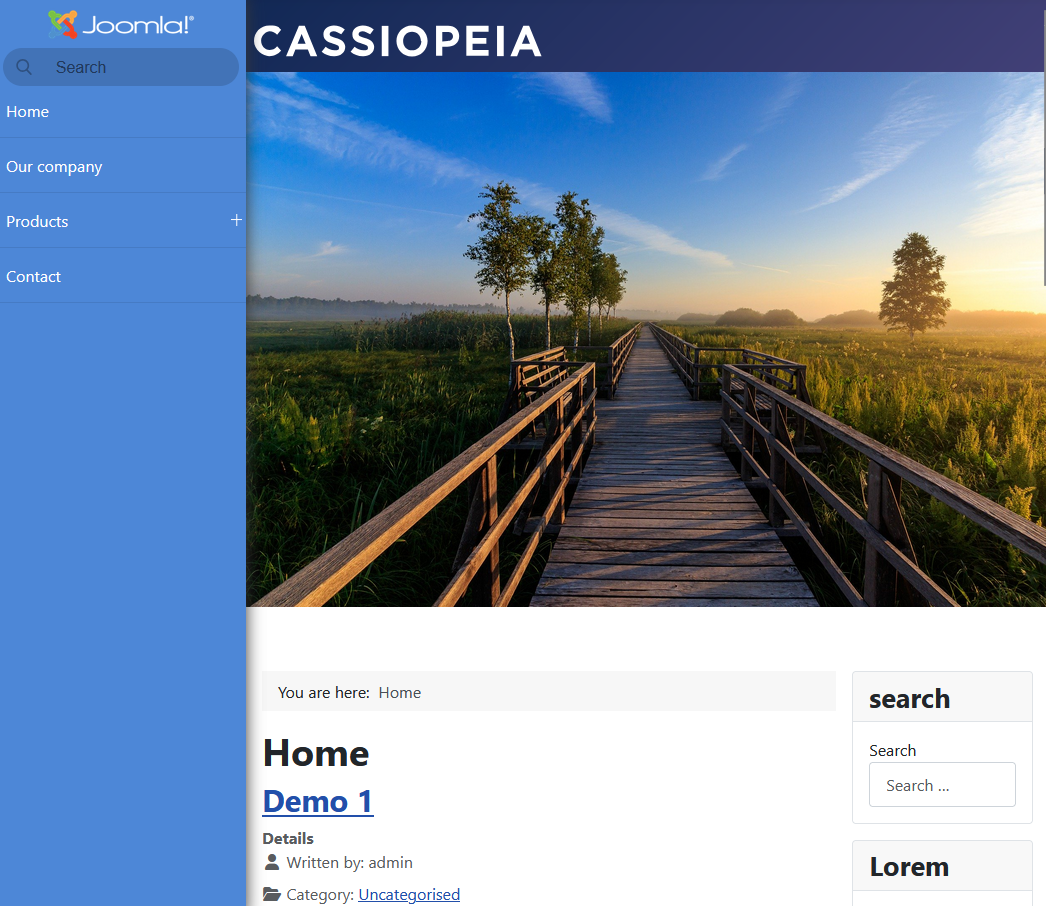
A well-designed side menu can significantly improve the navigation experience of your Joomla website. In this article, we'll explore how to create a collapsible accordion-style side menu with a logo at the top and a built-in search functionality to help users quickly find menu items.
Why Use an Accordion Side Menu?
Accordion menus are particularly useful for websites with extensive navigation structures. They allow you to organize multiple menu levels in a compact, user-friendly format where only one section expands at a time, keeping the interface clean and manageable.
Key Features
Our side menu implementation will include:
- Logo placement at the top for brand identity
- Search functionality to filter menu items in real-time
- Accordion behavior for collapsible menu sections
- Smooth animations for better user experience
- Responsive design that works across all devices
- Joomla integration using Accordeon Menu CK
Key Benefits for Joomla Sites
Space Efficiency: Accordion menus maximize limited sidebar space by displaying only the active menu section, making them ideal for sites with extensive navigation hierarchies.
Improved User Experience: Users can quickly scan top-level categories and drill down into specific sections without leaving the current page or dealing with cluttered dropdowns.
Mobile-Friendly: The vertical accordion structure adapts naturally to mobile screens, providing consistent navigation across all devices.
Features included with Accordeon Menu CK
Logo Integration
Adding your site logo at the top of the side menu reinforces brand identity and provides a consistent visual anchor. The logo area is clearly separated from the navigation items, located at the top of the side menu. You can go in the Accordeon Menu CK module options >> Logo options >> select your image in the Joomla media manager. Then you can use the options to display your logo as you want
- Logo link : to redirec to your website
- Image alt text : to improve your SEO and to be Accessible
- Logo position : choose if you want it to be on the left, center or right
- Logo dimensions : set the width and height of your image
- Margins : to move your logo into the side menu
Search Functionality
For websites with numerous menu items, an integrated search box becomes invaluable. This feature allows users to quickly filter and locate specific pages without manually expanding multiple accordion sections. The search work in real-time, instantly hiding non-matching items as users type. This is a native feature included into Accordeon Menu CK for Joomla.
Get more infos about the Instant Search Feature in an Accordion Menu
Smooth Transitions
Animation plays a crucial role in accordion usability. Smooth expand and collapse transitions help users understand the menu structure and maintain visual orientation as sections open and close.
How to create the side menu for Joomla
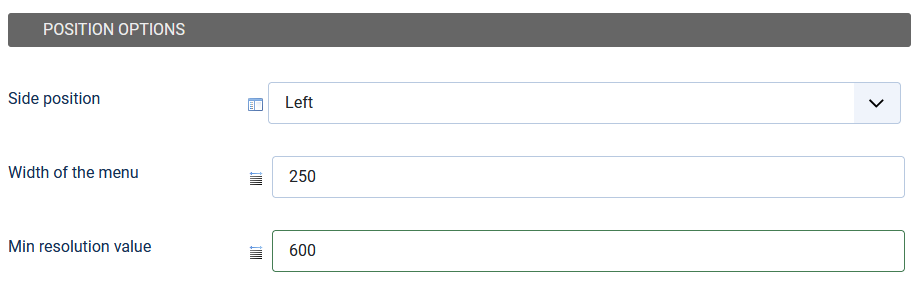
Edit the module Accordeon Menu CK in your Joomla website and go in the Styles tab >> Side position >> select left, or right.
The menu accordion will automatically take place in the left or right position of the screen, pushing the rest of the page accordingly. You can also set the various options for the width and min resolution :
- Side position : choose if you want the menu to be on the left or right side in the page
- Width of the menu : control the size of your side menu
- Min resolution value : the resolution under which you want to deactivate the side menu. Under this value, the menu will return to its original place in the template position
Watch the demo video : How to create a side menu for Joomla using Accordeon Menu CK
Conclusion
An accordion side menu with integrated logo and search functionality provides a powerful navigation solution for content-rich Joomla websites. By implementing this interface pattern thoughtfully, you can significantly improve how users discover and access your site's content.






News