
By default after install the module has these values
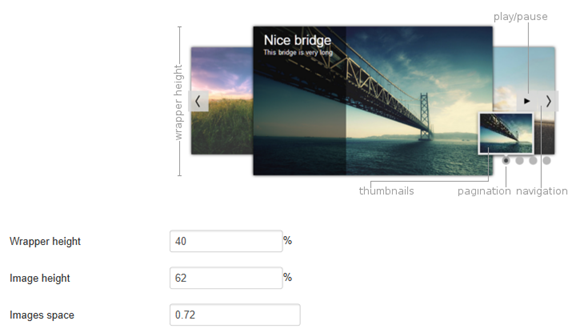
Wrapper height
This is the height of the whole container. For example if you have the carousel in a place that is 940px width, the carousel height will be 376px.
Image height
This value must be the image ratio between the height and width.
Example with an image which has the following dimensions : 800 x 500 px :
ratio = 500 / 800 * 100 = 62 %
For examle a value of 62 %, the natural image size (for the image preinstalled into the module):
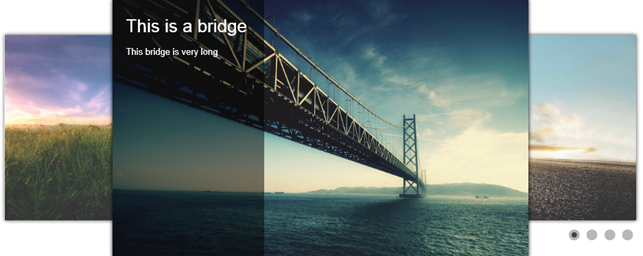
For example with a value of 80 %, the image will be distorded :
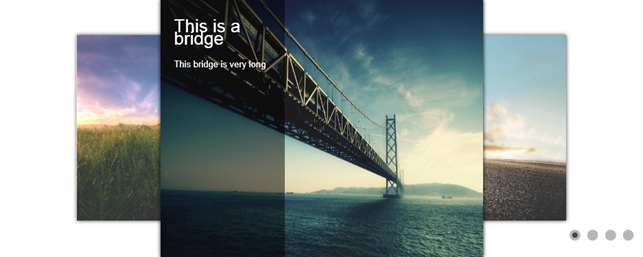
Images space
This value determines the main image and the side images. For example with 72 %, the images on the left and on the right will be 72 % of the size of the main image.
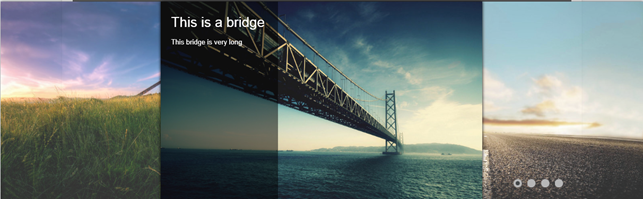
Example with the value to 1 :
How to setup the dimensions correctly ?
Now that you know how these values are used, you can setup your carousel.
The first thing that you must do is to set the image height to keep the ratio of your images (I suppose that all your images have the same dimensions, or at least the same ratio).
Then set the wrapper height to the value you want, to adjust the main image height into your website area. The wrapper height controls the whole carousel size, this is the main setting you have to play with.
Once you have set this, you can adjust the width of the carousel (the place that the image on the side takes into your screen) using the image spaces. This will make the side images closer to the main image if you reduce this value, and vice versa.






News