
When you activate a plugin it will publish some styles and scripts in your page to make it work. This is the case for Mediabox CK, a lightbox plugin for your Joomla website. Once you have published the plugin, you can use the lightbox anywhere. But if you want to optimize the load of your pages and avoid some unncessary loading of scripts, then you will need to check if this is possible.
Using Mediabox CK you can simply enable a loading option and it will do the job for you. Let's see how it works.
Choose the right loading option
Go in the plugin System - Mediabox CK and in the tab Advanced >> How to load the plugin. Here you will get 2 choices :
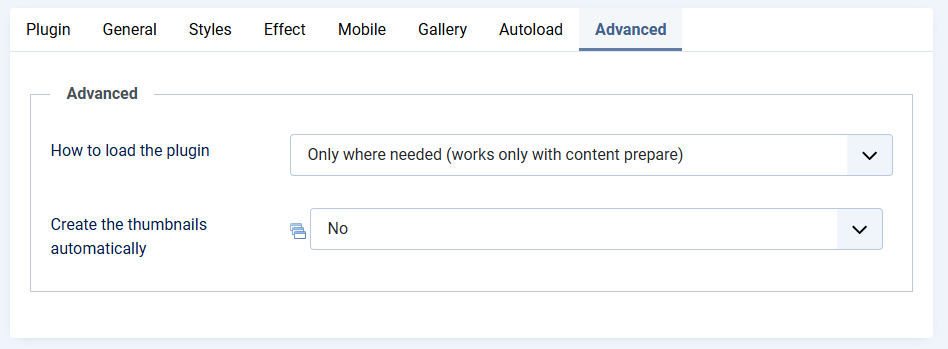
Only where needed (works only with content prepare): this option will check if Mediabox CK is required :- into the articles
- into any content that uses the onContentPrepare event (like the custom module, if the option is enabled in the module)
- into other JoomlaCK extensions : Slideshow CK, Slider CK, Carousel CK, Page Builder CK ...
On all pages: this is the basic behavior of the plugin, the scripts will be loaded on all pages and you can use the Mediabox CK feature anywhere (also in third party extension, if you have added the correct attribute to the link)
When you use the Only where needed option, then the scripts and styles will be loaded in the page only when it's necessary. For example, you are using Mediabox CK on a page where you have an image gallery :
- in the page with the gallery, the scripts and styles for Mediabox CK will be loaded
- on all other pages, nothing will be loaded in the page by Mediabox CK
It helps to maintain a light page load for your Joomla website, by only loading what is needed.
If you have any problem to load the lightbox, don't hesitate to ask for help on https://forum.joomlack.fr






News